


Run it on your hardware.
Deploy on a company server or your own machine. Connect the systems your team already uses.
Your goal. Your AI crew.
Your people and AI agents, working together.
One platform. On your infrastructure.
Your course. Your crew.
Run an agent workspace on your own hardware. Give every crew an isolated Linux environment, keep its knowledge with your team, and choose the AI that powers the work.
Deploy on a company server or your own machine. Connect the systems your team already uses.
Separate Linux environments, with the tools, dependencies, and access each crew needs.
Use supported providers and models through CLI adapters, or a local model through Ollama.
Conversations, issues, routines, and credentials belong to one platform — alongside the memory and journal that keep the work connected.
Self-hosted workspace. Your choice of inference: cloud providers receive the context you send; local model setups can keep inference on your infrastructure. Availability depends on the adapter and configuration.
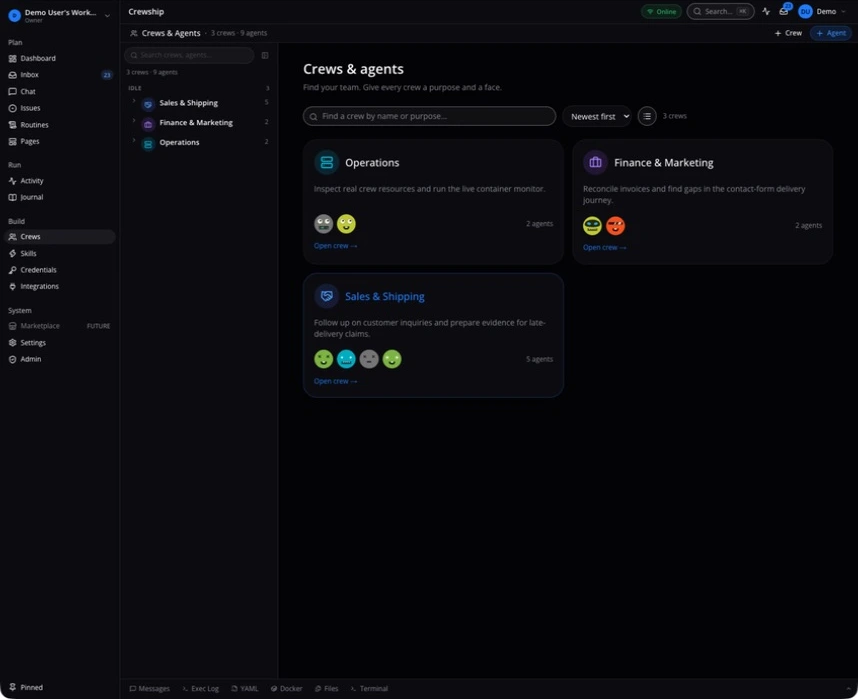
Actual screenshots from our development instance, with demo data.
Sales, finance, and operations crews in the actual Crewship workspace.
Captured from dev1 · Demo workspace · September 2026The next run starts with the context you kept, the tools you configured, and a routine your team can run again.
Give your crew the documents, spreadsheets, and data it needs. Each crew works in its own Linux devcontainer, with tools and access configured for the job.
debian:bookworm-slimpython:3.12-slimIllustrative tool setups. Connect services through configured CLIs, APIs, or MCP tools, using your own credentials and permissions.
Use workspace roles, agent ownership, and crew permissions to control who can manage the work. Scope the credentials each crew receives.
Inspect conversations, run events, and tool activity. Follow a report back to the work that produced it.
Run Crewship on your infrastructure. Inspect the source and review the current release before deploying. Crewship is in open beta.
Usage visibility depends on the provider and adapter. Subscription activity is not an exact per-task bill.
Explore access and oversightWho’s aboard
Explore eight engineering workflows as one example of what crews can do. Each crew runs in its own container, picks the CLI best for the job, and lands every action in the journal.
Different crews. One place to follow the work.
See all modulesA host with a supported container runtime, such as Docker or Podman. Install Crewship, check the environment with crewship doctor, and configure your first crew. The setup guide covers the supported installation paths.
A supported Ollama setup can run inference on your own infrastructure. You can also use supported cloud providers through CLI adapters. Available models, authentication, and tool support depend on the adapter and configuration.
The runtime boundary is one Linux container per crew. Agents have their own identities and can have persistent memory; agents in the same crew share its working environment.
The self-hosted workspace stores memory and working data on your infrastructure. Cloud models receive context included in their requests, and connected services receive data sent by tools. Use local inference and deliberately controlled tools when data must remain on-premises.
People with appropriate access can work with the same agent and its persistent context. Enable memory deliberately, configure crew knowledge, and review the role and permission model for your team.
Crewship is open beta. Review release notes and feature documentation, test your workflows, and pin a release before using it for important work. Routines and integrations continue to evolve.
Installation requires a host with a supported container runtime. This mobile website lets you explore the platform and setup instructions; it does not install a native mobile application.
Install Crewship on your computer or server. Then connect a supported container runtime and launch your first crew.
Full setup guidebrew install crewship-ai/tap/crewshipcrewship doctorcrewship startRequires Homebrew and a supported container runtime.
View install scriptRelease notes, improvements, and fixes. The product keeps moving; the changelog keeps the trail.
Read the changelogNew releases, fixes, and improvements. Follow the product as it develops.
Follow releases on GitHub to hear when a new version ships.
Follow releases